
Lesson 9 of 10 · 10 min read
Understanding postbacks
A plain-English explanation of advertiser and publisher postbacks, the IDs that connect them, and how OfferDaemon handles one conversion.
Reviewed 23 September 2026 · MyCPANetwork team
By the end of this lesson
Explain who sends each postback, which click ID it needs, and what you must verify before trusting a conversion.
Before you start
If you have completed the tracking test in lesson 8, you have seen a click and a conversion in OfferDaemon. This lesson explains why those records connect. You need only one example offer, one publisher and a pencil. No code is required.
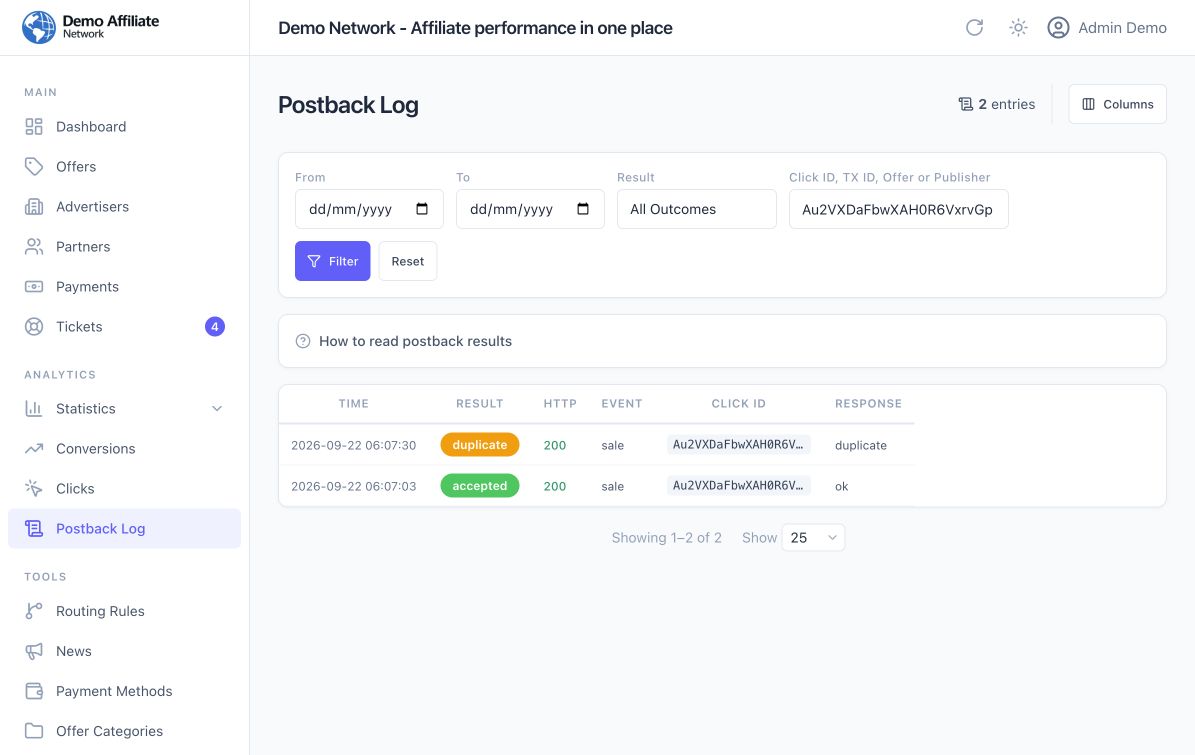
The dashboard screenshots below come from a controlled test in the demo network on 22 September 2026. Its advertiser callback was simulated. They show OfferDaemon receiving and recording a request; they do not show a real advertiser sending one or a publisher tracker receiving one.
What is a postback?
A postback is a short, automatic message from one system to another after an event. In a CPA campaign, that event is usually a lead, sale or other agreed action. The sender requests a URL belonging to the receiver and includes values such as a click ID and an event type. It is often called a server-to-server callback because the visitor does not have to return to your website to carry the message.
Think of it as a delivery note: “The action linked to this click happened.” The receiver still has to find the click and apply the offer rules. A postback is not the publisher's tracking link, the visitor's redirect, proof of payment or a request to approve a commission.
Follow one visitor from click to result
Imagine a publisher uses its own tracker and sends one visitor to your OfferDaemon offer.
- The publisher sends the click. Its tracking link can include the publisher's own click token as
external_click_id. Call that token P-204 in this example. - OfferDaemon records the click. It creates a different, network-owned
click_id. Call that N-861. The offer destination URL passes this ID to the advertiser through the{click_id}placeholder. The advertiser's page receives a real value, not the literal text{click_id}. - The advertiser saves N-861. When the visitor completes the agreed action, the advertiser can use that saved ID to tell your network which click converted.
- The advertiser sends the first postback to OfferDaemon. Its server calls your network's
/postbackURL withclick_id=N-861, an event such assale, and ideally a stable transaction reference. - OfferDaemon looks up N-861. It can now identify the offer and publisher, check the event against offer rules and create a publisher conversion if accepted. The conversion may still have
pendingapproval status. - OfferDaemon may send a second postback. If that publisher saved a callback URL in its profile, OfferDaemon sends a separate request to the publisher's tracker when the publisher conversion is created. It can return P-204 with
{external_click_id}, so the tracker recognizes its own click.
The direction changes twice: visitor → network → advertiser for the click; advertiser → network for the conversion report; and, only if configured, network → publisher tracker for its copy of the result.
- Advertiser postback: the advertiser or its tracker sends a message to your OfferDaemon network. OfferDaemon normally needs its own
click_idfrom the destination URL. - Publisher postback: OfferDaemon sends a different message to the publisher's external tracker. That tracker normally needs its own
external_click_idfrom the original tracking link.
The publisher postback is optional. OfferDaemon already records the conversion for the publisher without it; the extra message is for a publisher who wants the result in another tracking system.
Three IDs with three jobs
- Network
click_id: OfferDaemon creates this at click time. It uses the ID to match the advertiser's later message to its click record. - Publisher
external_click_id: the publisher's tracker creates this, if one is used. That tracker uses it to match OfferDaemon's later callback to its own click. - Advertiser
tx_id: the advertiser creates this for the action. It helps identify one transaction and avoid counting an ordinary retry twice.
These are not three names for one value. A publisher may use sub1 instead of external_click_id for its tracker token if both sides agree on the mapping. The advertiser must still return OfferDaemon's click ID for the normal click-based postback. OfferDaemon also supports a specialized clickless offer_id + publisher_id path, but it does not prove which tracked visit converted; start with the click-based path.
The advertiser-to-network message in OfferDaemon
Open Settings → Postback URL in the admin dashboard. Your postback URL is the receiving address to give the advertiser. The dashboard shows the effective network hostname and a Copy button. The advertiser puts this URL in its own conversion settings and replaces its tokens with actual values at send time. Ask which advertiser token contains the OfferDaemon click ID; token syntax varies by system.
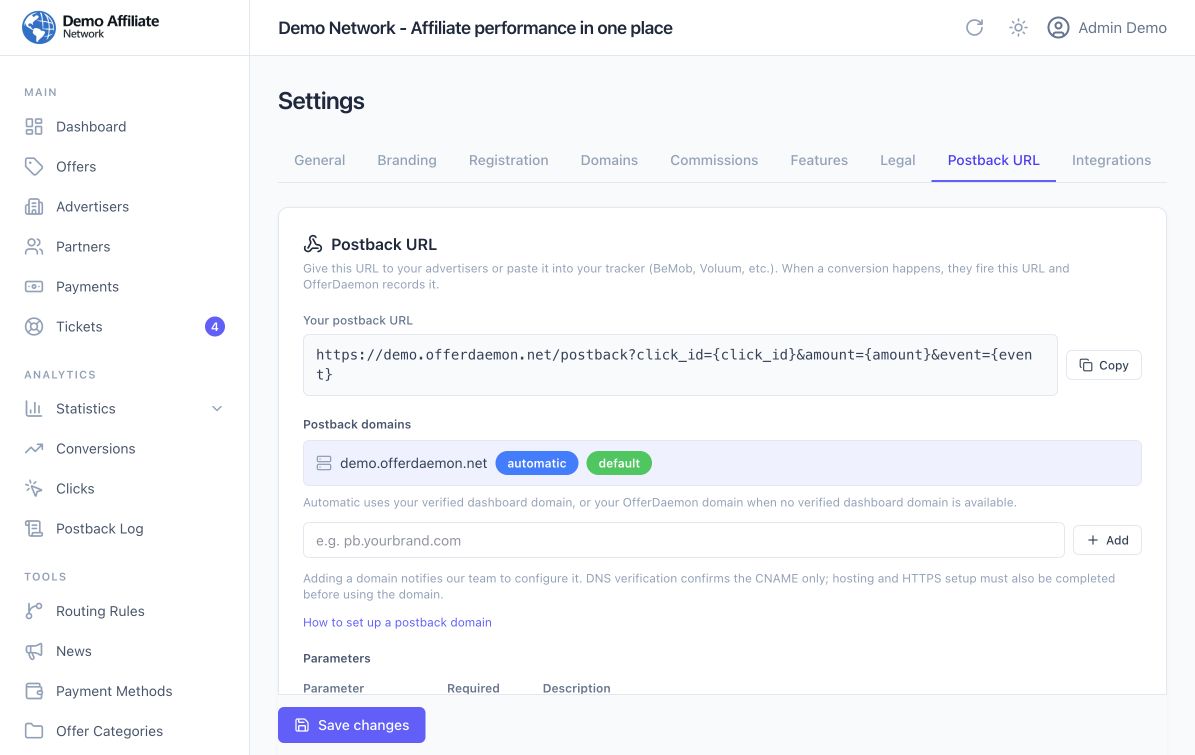
A simplified, non-live example after the advertiser has substituted real values is:
https://network.example/postback?click_id=N-861&event=sale&tx_id=ORDER-42
Here click_id answers “which visit?”, event answers “what happened?”, and tx_id answers “which advertiser transaction?”. The example IDs and .example hostname are placeholders, not values to send to OfferDaemon. For a fixed-rate offer, the configured revenue and publisher payout can be used without an amount parameter. RevShare needs a positive amount for a normal conversion; other rate models differ. Check the OfferDaemon postback parameter reference before agreeing on amounts or events.
After the request, open Postback Log. An accepted result means OfferDaemon processed that request; duplicate means it did not create another ordinary conversion. An HTTP 200 response can accompany either result. A missing or unrecognized click ID can prevent a conversion. Read the result and response, then check Conversions for the actual offer, publisher, values and status.
The optional network-to-publisher message
The publisher's receiving URL is a different address. In OfferDaemon, the publisher can save it under Profile → Conversion Postback → Your postback URL. For example, a publisher might provide this template:
https://publisher-tracker.example/postback?clickid={external_click_id}&payout={payout}&status={status}
OfferDaemon replaces those braces with values from the new publisher conversion and its original click, then sends a GET request to the publisher's tracker. In the example above, clickid must become the publisher's P-204, not the network's N-861. If P-204 was never passed into the tracking link, {external_click_id} has no useful value for the publisher's tracker. The publisher must check the tracker received and matched the callback.
This callback is sent when a new publisher conversion is created, including one with pending status. Later approval or rejection does not automatically send a fresh status callback. Delivery is asynchronous and best effort: a conversion in OfferDaemon does not by itself prove the publisher's tracker received the message. Verify the receiving tracker and reconcile records if needed. The publisher postback guide lists the available placeholders.
One naming trap: in the incoming advertiser URL, payout= is an accepted alias for amount= and does not override the publisher's rate. In the outgoing publisher URL, {payout} is a placeholder for the publisher conversion's payout. The same word plays different roles because the two URLs belong to different integrations.
Test the two directions separately
- Ask the advertiser to save the OfferDaemon click ID from a permitted test click and trigger the agreed test action through its own system. Agree beforehand how that event will be excluded from normal billing.
- In OfferDaemon, compare the click ID in Clicks, the outcome in Postback Log, and the publisher row in Conversions. A
pendingconversion means it awaits approval; it is not a failed postback. - If the publisher uses an external tracker, confirm it sent its own click token in the tracking link and saved a valid callback URL. Then ask it to find the matching callback and conversion in that tracker.
If you only open a completed postback URL yourself, you test OfferDaemon's receiving path. You have not tested whether the real advertiser stored and returned the ID. The controlled screenshots on this page show that limited kind of test. Follow the full click-to-conversion walkthrough when you need exact screen steps.
Common mix-ups
- “The click appeared, so the conversion must appear.” A click proves the visit was tracked. The advertiser still has to report the completed action with a matching ID.
- “The advertiser can send its own click ID instead.” OfferDaemon needs the ID it created, unless you deliberately use and validate the separate clickless path.
- “The postback returned 200, so the publisher was paid.” A duplicate can also return 200; a new conversion can remain pending; payment is a later business step.
- “The publisher callback is the advertiser postback.” They have different senders, receiving URLs and often different click IDs.
- “The Postback Log proves the publisher got the result.” It covers the incoming request. Check the publisher's receiving tracker for the optional outgoing request.
Your checklist
Tick each point when you feel ready.
The visitor's click goes toward the advertiser; the advertiser's conversion message returns to the network; a separate message may then go to the publisher's tracker.
The ID sent in the offer destination URL must be stored by the advertiser and returned unchanged as click_id.
A publisher using another tracker must pass its own click token in the tracking link and save a receiving URL in its profile.
These are three separate results: network processing, conversion approval status and delivery to a publisher's external tracker.
A complete test checks the advertiser's real send, OfferDaemon's log and conversion, and the publisher tracker if it expects a callback.
0 of 5 checked
Your progress stays in this browser.Next step
Use the weekly operating routine to keep click, conversion and partner records aligned after the pilot starts.
Want a hand with this step?
Get practical setup help from the team behind OfferDaemon.